The Crystal Reports Viewer
Two runtime versions of the Crystal Reports Viewer are provided with EMu 10: Crystal 11.5 (32 bit) and Crystal 2025 (64 bit). To make use of the Crystal 2025 Viewer it is necessary to upgrade EMu’s existing 32 bit reports to 64 bit. EMu's default reports (those provided out-of-the-box by Axiell) have been upgraded and display in the latest Viewer; all other 32 bit reports will be viewed in the Crystal 11.5 Viewer until they are upgraded, a process outlined here. While it is not necessary to upgrade to the Crystal 2025 Viewer immediately, be aware that support for 32 bit libraries does have an end of life.
Note: Upgrading 32 bit reports to 64 bit reports requires access to a full version of Crystal Reports 2025.
When a Crystal report is run in EMu, the Crystal Reports Viewer opens and displays the report.
The following report was run in the Parties module:
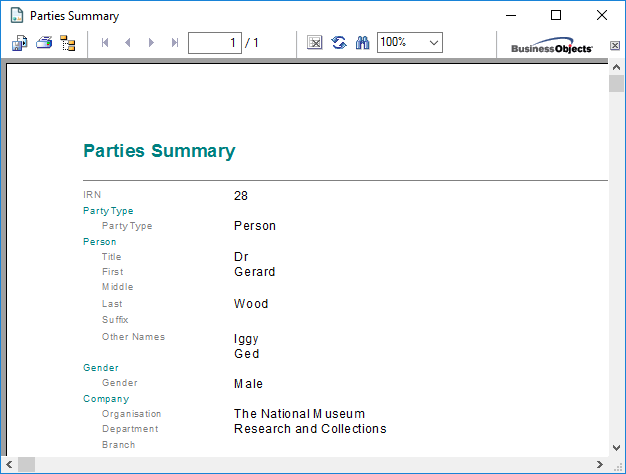
Options in the Crystal Reports Viewer include:
|
Icon |
Function |
Description |
|---|---|---|
|
|
Export Report |
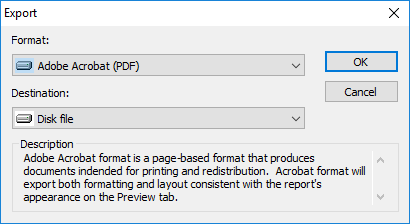
The report data can be exported in a wide variety of formats. When Export Report
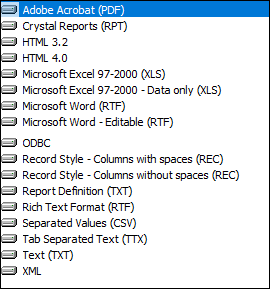
From the Format drop list, select one of the following formats for the report data:
From the Destination drop list you can choose to:
|
|
|
Print Report |
Print the report. |
|
|
Toggle Group Tree |
Display / hide a left hand column that shows the hierarchy of groups (if the report specifies groups). |
|
|
Stop Loading |
Stop the report loading (if it is taking too long to load, for instance). |
|
|
Refresh |
Refresh the data in the report. |
|
|
Search Text |
Search the text of the report. |



 Feedback